
ایجاد Listview چند بخشی با استفاده از json در اندروید
شنبه 5 دی 1394در این مقاله قصد داریم یک لیست چند سطحی را با استفاده از توابع json در اندروید توضیح دهیم که از یک مثال ساده شروع کردیم .
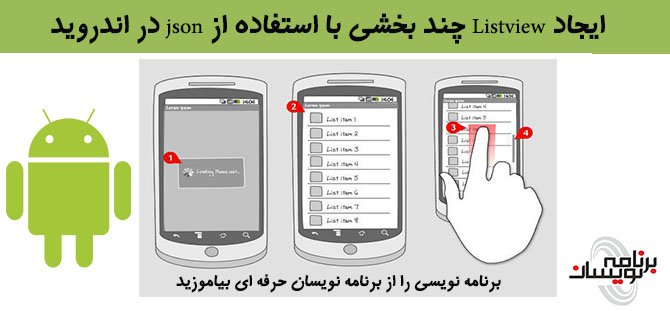
فرض کنید می خواهید یک آلبوم صوتی ایجاد نمایید ابتدا لیستی از کل آلبوم ها و بعد لیستی از موسیقی های هر آلبوم و در آخر اطلاعات هر موسیقی را نمایش خواهد داد.علاوه بر آن می خواهیم تعداد موسیقی های هر فصل را هم در کنار لیست ویو مورد نظر قرار دهیم.
یک پروژه ی جدید ایجاد نمایید و برای پروژه ی خود یک package نام گذاری نمایید، در فایل androidmanifest مجوزهای دسترسی را وارد نمایید.
  <uses-permission android:name="android.permission.INTERNET" />

    <!-- Network State Permissions -->
    <uses-permission android:name="android.permission.ACCESS_NETWORK_STATE" />
یک کلاس به نام AlertDialogManager را می سازید به صورت زیر:
package com.barnnamenevisan.listview;

import android.app.AlertDialog;
import android.content.Context;
import android.content.DialogInterface;

/**
 * Created by Esmaili-PC on 23/12/2015.
 */
public class AlertDialogManager {
    public void showAlertDialog(Context context, String title, String message,
                                Boolean status) {
        AlertDialog alertDialog = new AlertDialog.Builder(context).create();

        // Setting Dialog Title
        alertDialog.setTitle(title);

        // Setting Dialog Message
        alertDialog.setMessage(message);

        if(status != null)
            // Setting alert dialog icon
            alertDialog.setIcon((status) ? R.drawable.success : R.drawable.fail);

        // Setting OK Button
        alertDialog.setButton("OK", new DialogInterface.OnClickListener() {
            public void onClick(DialogInterface dialog, int which) {
            }
        });

        // Showing Alert Message
        alertDialog.show();
    }
}
یک کلاس دیگر به نام ConnectionDetector می سازید این کلاس برای شناسایی اینترنت استفاده می شود.
package com.barnnamenevisan.listview;

import android.content.Context;
import android.net.ConnectivityManager;
import android.net.NetworkInfo;

/**
 * Created by Esmaili-PC on 23/12/2015.
 */
public class ConnectionDetector {
    private Context _context;

    public ConnectionDetector(Context context){
        this._context = context;
    }

    /**
     * Checking for all possible internet providers
     * **/
    public boolean isConnectingToInternet(){
        ConnectivityManager connectivity = (ConnectivityManager) _context.getSystemService(Context.CONNECTIVITY_SERVICE);
        if (connectivity != null)
        {
            NetworkInfo[] info = connectivity.getAllNetworkInfo();
            if (info != null)
                for (int i = 0; i < info.length; i++)
                    if (info[i].getState() == NetworkInfo.State.CONNECTED)
                    {
                        return true;
                    }

        }
        return false;
    }
}
یک کلاس جدید به نام JSONParser.java را درست نمایید.این کلاس مورد استفاده برای گرفتن داده های json با درخواست Http است.
package com.barnnamenevisan.listview;

import android.util.Log;
import org.apache.http.HttpEntity;
import org.apache.http.HttpResponse;
import org.apache.http.NameValuePair;
import org.apache.http.client.ClientProtocolException;
import org.apache.http.client.entity.UrlEncodedFormEntity;
import org.apache.http.client.methods.HttpGet;
import org.apache.http.client.methods.HttpPost;
import org.apache.http.client.utils.URLEncodedUtils;
import org.apache.http.impl.client.DefaultHttpClient;
import org.json.JSONObject;

import java.io.*;
import java.util.List;

/**
 * Created by Esmaili-PC on 23/12/2015.
 */
public class JSONParser {
    static InputStream is = null;
    static JSONObject jObj = null;
    static String json = "";

    // constructor
    public JSONParser() {

    }

    // function get json from url
    // by making HTTP POST or GET mehtod
    public String makeHttpRequest(String url, String method,
                                  List<NameValuePair> params) {

        // Making HTTP request
        try {

            // check for request method
            if (method == "POST") {
                // request method is POST
                // defaultHttpClient
                DefaultHttpClient httpClient = new DefaultHttpClient();
                HttpPost httpPost = new HttpPost(url);
                httpPost.setEntity(new UrlEncodedFormEntity(params));

                HttpResponse httpResponse = httpClient.execute(httpPost);
                HttpEntity httpEntity = httpResponse.getEntity();
                is = httpEntity.getContent();

            } else if (method == "GET") {
                // request method is GET
                DefaultHttpClient httpClient = new DefaultHttpClient();
                String paramString = URLEncodedUtils.format(params, "utf-8");
                url += "?" + paramString;
                HttpGet httpGet = new HttpGet(url);

                HttpResponse httpResponse = httpClient.execute(httpGet);
                HttpEntity httpEntity = httpResponse.getEntity();
                is = httpEntity.getContent();
            }

        } catch (UnsupportedEncodingException e) {
            e.printStackTrace();
        } catch (ClientProtocolException e) {
            e.printStackTrace();
        } catch (IOException e) {
            e.printStackTrace();
        }

        try {
            BufferedReader reader = new BufferedReader(new InputStreamReader(
                    is, "iso-8859-1"), 8);
            StringBuilder sb = new StringBuilder();
            String line = null;
            while ((line = reader.readLine()) != null) {
                sb.append(line + "\n");
            }
            is.close();
            json = sb.toString();
        } catch (Exception e) {
            Log.e("Buffer Error", "Error converting result " + e.toString());
        }

        // return JSON String
        return json;

    }
}
حالا یک activity باید ایجاد نمایید به صورت زیر :
<?xml version="1.0" encoding="utf-8"?>
<LinearLayout xmlns:android="http://schemas.android.com/apk/res/android"
    android:layout_width="fill_parent"
    android:layout_height="fill_parent"
    android:orientation="vertical"
    android:background="#ffffff">

    <ListView
        android:id="@android:id/list"
        android:layout_width="fill_parent"
        android:layout_height="wrap_content"
        android:divider="#b5b5b5"
        android:dividerHeight="1dp"
        android:cacheColorHint="#00000000"/>

</LinearLayout>
یک activity بر ای نمایش تک تک اطلاعات هر موسیقی استفاده می شود:
<RelativeLayout xmlns:android="http://schemas.android.com/apk/res/android"
    android:layout_width="fill_parent"
    android:layout_height="wrap_content"
    android:orientation="vertical">

    <!-- Album id / Hidden by default -->
    <TextView
        android:id="@+id/album_id"
        android:layout_width="fill_parent"
        android:layout_height="wrap_content"
        android:visibility="gone" />

    <!-- Album Name -->
    <TextView
        android:id="@+id/album_name"
        android:layout_width="fill_parent"
        android:layout_height="wrap_content"
        android:textSize="16dip"
        android:textColor="#000000"
        android:paddingTop="15dip"
        android:paddingBottom="15dip"
        android:paddingLeft="10dip"
        android:textStyle="bold"/>

    <!-- Album Songs count -->
    <TextView android:id="@+id/songs_count"
        android:layout_width="wrap_content"
        android:layout_height="wrap_content"
        android:layout_alignParentRight="true"
        android:textColor="#ffffff"
        android:textStyle="bold"
        android:background="#9ed321"
        android:paddingRight="3dip"
        android:paddingLeft="3dip"/>


</RelativeLayout>
یک کلاس albumactivity می سازید که از کلاس activity به ارث می برد به صورت زیر:
package com.barnnamenevisan.listview;

import android.app.ListActivity;
import android.app.ProgressDialog;
import android.content.Intent;
import android.os.AsyncTask;
import android.os.Bundle;
import android.util.Log;
import android.view.View;
import android.widget.*;
import org.apache.http.NameValuePair;
import org.json.JSONArray;
import org.json.JSONException;
import org.json.JSONObject;

import java.util.ArrayList;
import java.util.HashMap;
import java.util.List;

/**
 * Created by Esmaili-PC on 23/12/2015.
 */
public class AlbumsActivity extends ListActivity {
    // Connection detector
    ConnectionDetector cd;

    // Alert dialog manager
    AlertDialogManager alert = new AlertDialogManager();

    // Progress Dialog
    private ProgressDialog pDialog;

    // Creating JSON Parser object
    JSONParser jsonParser = new JSONParser();

    ArrayList<HashMap<String, String>> albumsList;

    // albums JSONArray
    JSONArray albums = null;

    // albums JSON url
    private static final String URL_ALBUMS = "http://api.androidhive.info/songs/albums.php";

    // ALL JSON node names
    private static final String TAG_ID = "id";
    private static final String TAG_NAME = "name";
    private static final String TAG_SONGS_COUNT = "songs_count";

    @Override
    public void onCreate(Bundle savedInstanceState) {
        super.onCreate(savedInstanceState);
        setContentView(R.layout.albums_activity);

        cd = new ConnectionDetector(getApplicationContext());

        // Check for internet connection
        if (!cd.isConnectingToInternet()) {
            // Internet Connection is not present
            alert.showAlertDialog(AlbumsActivity.this, "Internet Connection Error",
                    "Please connect to working Internet connection", false);
            // stop executing code by return
            return;
        }

        // Hashmap for ListView
        albumsList = new ArrayList<HashMap<String, String>>();

        // Loading Albums JSON in Background Thread
        new LoadAlbums().execute();

        // get listview
        ListView lv = getListView();

        /**
         * Listview item click listener
         * TrackListActivity will be lauched by passing album id
         * */
        lv.setOnItemClickListener(new android.widget.AdapterView.OnItemClickListener() {
            @Override
            public void onItemClick(AdapterView<?> arg0, View view, int arg2,
                                    long arg3) {
                // on selecting a single album
                // TrackListActivity will be launched to show tracks inside the album
                Intent i = new Intent(getApplicationContext(), TrackListActivity.class);

                // send album id to tracklist activity to get list of songs under that album
                String album_id = ((TextView) view.findViewById(R.id.album_id)).getText().toString();
                i.putExtra("album_id", album_id);

                startActivity(i);
            }
        });
    }

    /**
     * Background Async Task to Load all Albums by making http request
     * */
    class LoadAlbums extends AsyncTask<String, String, String> {

        /**
         * Before starting background thread Show Progress Dialog
         * */
        @Override
        protected void onPreExecute() {
            super.onPreExecute();
            pDialog = new ProgressDialog(AlbumsActivity.this);
            pDialog.setMessage("Listing Albums ...");
            pDialog.setIndeterminate(false);
            pDialog.setCancelable(false);
            pDialog.show();
        }

        /**
         * getting Albums JSON
         * */
        protected String doInBackground(String... args) {
            // Building Parameters
            List<NameValuePair> params = new ArrayList<NameValuePair>();

            // getting JSON string from URL
            String json = jsonParser.makeHttpRequest(URL_ALBUMS, "GET",
                    params);

            // Check your log cat for JSON reponse
            Log.d("Albums JSON: ", "> " + json);

            try {
                albums = new JSONArray(json);

                if (albums != null) {
                    // looping through All albums
                    for (int i = 0; i < albums.length(); i++) {
                        JSONObject c = albums.getJSONObject(i);

                        // Storing each json item values in variable
                        String id = c.getString(TAG_ID);
                        String name = c.getString(TAG_NAME);
                        String songs_count = c.getString(TAG_SONGS_COUNT);

                        // creating new HashMap
                        HashMap<String, String> map = new HashMap<String, String>();

                        // adding each child node to HashMap key => value
                        map.put(TAG_ID, id);
                        map.put(TAG_NAME, name);
                        map.put(TAG_SONGS_COUNT, songs_count);

                        // adding HashList to ArrayList
                        albumsList.add(map);
                    }
                }else{
                    Log.d("Albums: ", "null");
                }

            } catch (JSONException e) {
                e.printStackTrace();
            }

            return null;
        }

        /**
         * After completing background task Dismiss the progress dialog
         * **/
        protected void onPostExecute(String file_url) {
            // dismiss the dialog after getting all albums
            pDialog.dismiss();
            // updating UI from Background Thread
            runOnUiThread(new Runnable() {
                public void run() {
                    /**
                     * Updating parsed JSON data into ListView
                     * */
                    ListAdapter adapter = new SimpleAdapter(
                            AlbumsActivity.this, albumsList,
                            R.layout.list_item_albums, new String[] { TAG_ID,
                            TAG_NAME, TAG_SONGS_COUNT }, new int[] {
                            R.id.album_id, R.id.album_name, R.id.songs_count });

                    // updating listview
                    setListAdapter(adapter);
                }
            });

        }

    }
}
ما با استفاده از async برای درخواست یک موسیقی از یک تابع json یک درخواست Http ارسال می شود.
باید یک کلاس تعریف نماییم و لیست کامل موسیقی ها را در آن قرار دهیم به صورت زیر:
package com.barnnamenevisan.listview;

import android.app.ListActivity;
import android.app.ProgressDialog;
import android.content.Intent;
import android.os.AsyncTask;
import android.os.Bundle;
import android.util.Log;
import android.view.View;
import android.widget.*;
import org.apache.http.NameValuePair;
import org.json.JSONArray;
import org.json.JSONException;
import org.json.JSONObject;

import java.util.ArrayList;
import java.util.HashMap;
import java.util.List;

/**
 * Created by Esmaili-PC on 23/12/2015.
 */
public class AlbumsActivity extends ListActivity {
    // Connection detector
    ConnectionDetector cd;

    // Alert dialog manager
    AlertDialogManager alert = new AlertDialogManager();

    // Progress Dialog
    private ProgressDialog pDialog;

    // Creating JSON Parser object
    JSONParser jsonParser = new JSONParser();

    ArrayList<HashMap<String, String>> albumsList;

    // albums JSONArray
    JSONArray albums = null;

    // albums JSON url
    private static final String URL_ALBUMS = "http://api.androidhive.info/songs/albums.php";

    // ALL JSON node names
    private static final String TAG_ID = "id";
    private static final String TAG_NAME = "name";
    private static final String TAG_SONGS_COUNT = "songs_count";

    @Override
    public void onCreate(Bundle savedInstanceState) {
        super.onCreate(savedInstanceState);
        setContentView(R.layout.albums_activity);

        cd = new ConnectionDetector(getApplicationContext());

        // Check for internet connection
        if (!cd.isConnectingToInternet()) {
            // Internet Connection is not present
            alert.showAlertDialog(AlbumsActivity.this, "Internet Connection Error",
                    "Please connect to working Internet connection", false);
            // stop executing code by return
            return;
        }

        // Hashmap for ListView
        albumsList = new ArrayList<HashMap<String, String>>();

        // Loading Albums JSON in Background Thread
        new LoadAlbums().execute();

        // get listview
        ListView lv = getListView();

        /**
         * Listview item click listener
         * TrackListActivity will be lauched by passing album id
         * */
        lv.setOnItemClickListener(new android.widget.AdapterView.OnItemClickListener() {
            @Override
            public void onItemClick(AdapterView<?> arg0, View view, int arg2,
                                    long arg3) {
                // on selecting a single album
                // TrackListActivity will be launched to show tracks inside the album
                Intent i = new Intent(getApplicationContext(), TrackListActivity.class);

                // send album id to tracklist activity to get list of songs under that album
                String album_id = ((TextView) view.findViewById(R.id.album_id)).getText().toString();
                i.putExtra("album_id", album_id);

                startActivity(i);
            }
        });
    }

    /**
     * Background Async Task to Load all Albums by making http request
     * */
    class LoadAlbums extends AsyncTask<String, String, String> {

        /**
         * Before starting background thread Show Progress Dialog
         * */
        @Override
        protected void onPreExecute() {
            super.onPreExecute();
            pDialog = new ProgressDialog(AlbumsActivity.this);
            pDialog.setMessage("Listing Albums ...");
            pDialog.setIndeterminate(false);
            pDialog.setCancelable(false);
            pDialog.show();
        }

        /**
         * getting Albums JSON
         * */
        protected String doInBackground(String... args) {
            // Building Parameters
            List<NameValuePair> params = new ArrayList<NameValuePair>();

            // getting JSON string from URL
            String json = jsonParser.makeHttpRequest(URL_ALBUMS, "GET",
                    params);

            // Check your log cat for JSON reponse
            Log.d("Albums JSON: ", "> " + json);

            try {
                albums = new JSONArray(json);

                if (albums != null) {
                    // looping through All albums
                    for (int i = 0; i < albums.length(); i++) {
                        JSONObject c = albums.getJSONObject(i);

                        // Storing each json item values in variable
                        String id = c.getString(TAG_ID);
                        String name = c.getString(TAG_NAME);
                        String songs_count = c.getString(TAG_SONGS_COUNT);

                        // creating new HashMap
                        HashMap<String, String> map = new HashMap<String, String>();

                        // adding each child node to HashMap key => value
                        map.put(TAG_ID, id);
                        map.put(TAG_NAME, name);
                        map.put(TAG_SONGS_COUNT, songs_count);

                        // adding HashList to ArrayList
                        albumsList.add(map);
                    }
                }else{
                    Log.d("Albums: ", "null");
                }

            } catch (JSONException e) {
                e.printStackTrace();
            }

            return null;
        }

        /**
         * After completing background task Dismiss the progress dialog
         * **/
        protected void onPostExecute(String file_url) {
            // dismiss the dialog after getting all albums
            pDialog.dismiss();
            // updating UI from Background Thread
            runOnUiThread(new Runnable() {
                public void run() {
                    /**
                     * Updating parsed JSON data into ListView
                     * */
                    ListAdapter adapter = new SimpleAdapter(
                            AlbumsActivity.this, albumsList,
                            R.layout.list_item_albums, new String[] { TAG_ID,
                            TAG_NAME, TAG_SONGS_COUNT }, new int[] {
                            R.id.album_id, R.id.album_name, R.id.songs_count });

                    // updating listview
                    setListAdapter(adapter);
                }
            });

        }

    }
}
مرحله ی بعدی ساخت لایه ی دوم فهرست موسیقی ما است به صورت زیر:
یک کلاس تعریف نمایید که از کلاس ListActivity ارث ببرد
یک لایه برای نمایش لیست استفاده نمایید به صورت زیر:
<LinearLayout xmlns:android="http://schemas.android.com/apk/res/android"
    android:layout_width="fill_parent"
    android:layout_height="fill_parent"
    android:orientation="vertical"
    android:background="#ffffff">

    <ListView
        android:id="@android:id/list"
        android:layout_width="fill_parent"
        android:layout_height="wrap_content"
        android:divider="#b5b5b5"
        android:dividerHeight="1dp"
        android:cacheColorHint="#00000000"/>

</LinearLayout>
دوباره یک activity دیگر تعریف نمایید که این activity برای نمایش تک تک موسیقی مورد نظر است به صورت زیر:
<RelativeLayout xmlns:android="http://schemas.android.com/apk/res/android"
    android:layout_width="fill_parent"
    android:layout_height="wrap_content" >

    <!-- Album id / Hidden by default -->
    <TextView
        android:id="@+id/album_id"
        android:layout_width="fill_parent"
        android:layout_height="wrap_content"
        android:visibility="gone" />

    <!-- Song id / Hidden by default -->
    <TextView
        android:id="@+id/song_id"
        android:layout_width="fill_parent"
        android:layout_height="wrap_content"
        android:visibility="gone" />

    <!-- Track serial no -->
    <TextView
        android:id="@+id/track_no"
        android:layout_width="wrap_content"
        android:layout_height="wrap_content"
        android:paddingBottom="15dip"
        android:paddingLeft="5dip"
        android:paddingTop="15dip"
        android:textColor="#000000"
        android:textSize="16dip"
        android:layout_alignParentLeft="true"/>

    <!-- Song Name -->
    <TextView
        android:id="@+id/album_name"
        android:layout_width="wrap_content"
        android:layout_height="wrap_content"
        android:paddingBottom="15dip"
        android:paddingLeft="5dip"
        android:paddingTop="15dip"
        android:textColor="#000000"
        android:textSize="16dip"
        android:layout_toRightOf="@+id/track_no"/>

    <!-- Song duration -->
    <TextView
        android:id="@+id/song_duration"
        android:layout_width="wrap_content"
        android:layout_height="wrap_content"
        android:layout_alignParentRight="true"
        android:layout_centerVertical="true"
        android:paddingLeft="3dip"
        android:paddingRight="6dip"
        android:textColor="#9ed321" />

</RelativeLayout>
داخل کلاس جاوا باید id مورد نظر را دریافت نماییم با استفاده از درخواست http لیست آهنگ مورد نظر را دریافت خواهد کرد وداخل کلاس زیر موسیقی مورد نظر را ارسال می نماید.
package com.barnnamenevisan.listview;

import android.app.ListActivity;
import android.app.ProgressDialog;
import android.content.Intent;
import android.os.AsyncTask;
import android.os.Bundle;
import android.util.Log;
import android.view.View;
import android.widget.*;
import org.apache.http.NameValuePair;
import org.apache.http.message.BasicNameValuePair;
import org.json.JSONArray;
import org.json.JSONException;
import org.json.JSONObject;

import java.util.ArrayList;
import java.util.HashMap;
import java.util.List;

/**
 * Created by Esmaili-PC on 23/12/2015.
 */
public class TrackListActivity extends ListActivity {
    // Connection detector
    ConnectionDetector cd;

    // Alert dialog manager
    AlertDialogManager alert = new AlertDialogManager();

    // Progress Dialog
    private ProgressDialog pDialog;

    // Creating JSON Parser object
    JSONParser jsonParser = new JSONParser();

    ArrayList<HashMap<String, String>> tracksList;

    // tracks JSONArray
    JSONArray albums = null;

    // Album id
    String album_id, album_name;

    // tracks JSON url
    // id - should be posted as GET params to get track list (ex: id = 5)
    private static final String URL_ALBUMS = "http://api.androidhive.info/songs/album_tracks.php";

    // ALL JSON node names
    private static final String TAG_SONGS = "songs";
    private static final String TAG_ID = "id";
    private static final String TAG_NAME = "name";
    private static final String TAG_ALBUM = "album";
    private static final String TAG_DURATION = "duration";

    @Override
    public void onCreate(Bundle savedInstanceState) {
        super.onCreate(savedInstanceState);
        setContentView(R.layout.activity_tracks);

        cd = new ConnectionDetector(getApplicationContext());

        // Check if Internet present
        if (!cd.isConnectingToInternet()) {
            // Internet Connection is not present
            alert.showAlertDialog(TrackListActivity.this, "Internet Connection Error",
                    "Please connect to working Internet connection", false);
            // stop executing code by return
            return;
        }

        // Get album id
        Intent i = getIntent();
        album_id = i.getStringExtra("album_id");

        // Hashmap for ListView
        tracksList = new ArrayList<HashMap<String, String>>();

        // Loading tracks in Background Thread
        new LoadTracks().execute();

        // get listview
        ListView lv = getListView();

        /**
         * Listview on item click listener
         * SingleTrackActivity will be lauched by passing album id, song id
         * */
        lv.setOnItemClickListener(new android.widget.AdapterView.OnItemClickListener() {
            @Override
            public void onItemClick(AdapterView<?> arg0, View view, int arg2,
                                    long arg3) {
                // On selecting single track get song information
                Intent i = new Intent(getApplicationContext(), SingleTrackActivity.class);

                // to get song information
                // both album id and song is needed
                String album_id = ((TextView) view.findViewById(R.id.album_id)).getText().toString();
                String song_id = ((TextView) view.findViewById(R.id.song_id)).getText().toString();

                Toast.makeText(getApplicationContext(), "Album Id: " + album_id  + ", Song Id: " + song_id, Toast.LENGTH_SHORT).show();

                i.putExtra("album_id", album_id);
                i.putExtra("song_id", song_id);

                startActivity(i);
            }
        });

    }

    /**
     * Background Async Task to Load all tracks under one album
     * */
    class LoadTracks extends AsyncTask<String, String, String> {

        /**
         * Before starting background thread Show Progress Dialog
         * */
        @Override
        protected void onPreExecute() {
            super.onPreExecute();
            pDialog = new ProgressDialog(TrackListActivity.this);
            pDialog.setMessage("Loading songs ...");
            pDialog.setIndeterminate(false);
            pDialog.setCancelable(false);
            pDialog.show();
        }

        /**
         * getting tracks json and parsing
         * */
        protected String doInBackground(String... args) {
            // Building Parameters
            List<NameValuePair> params = new ArrayList<NameValuePair>();

            // post album id as GET parameter
            params.add(new BasicNameValuePair(TAG_ID, album_id));

            // getting JSON string from URL
            String json = jsonParser.makeHttpRequest(URL_ALBUMS, "GET",
                    params);

            // Check your log cat for JSON reponse
            Log.d("Track List JSON: ", json);

            try {
                JSONObject jObj = new JSONObject(json);
                if (jObj != null) {
                    String album_id = jObj.getString(TAG_ID);
                    album_name = jObj.getString(TAG_ALBUM);
                    albums = jObj.getJSONArray(TAG_SONGS);

                    if (albums != null) {
                        // looping through All songs
                        for (int i = 0; i < albums.length(); i++) {
                            JSONObject c = albums.getJSONObject(i);

                            // Storing each json item in variable
                            String song_id = c.getString(TAG_ID);
                            // track no - increment i value
                            String track_no = String.valueOf(i + 1);
                            String name = c.getString(TAG_NAME);
                            String duration = c.getString(TAG_DURATION);

                            // creating new HashMap
                            HashMap<String, String> map = new HashMap<String, String>();

                            // adding each child node to HashMap key => value
                            map.put("album_id", album_id);
                            map.put(TAG_ID, song_id);
                            map.put("track_no", track_no + ".");
                            map.put(TAG_NAME, name);
                            map.put(TAG_DURATION, duration);

                            // adding HashList to ArrayList
                            tracksList.add(map);
                        }
                    } else {
                        Log.d("Albums: ", "null");
                    }
                }

            } catch (JSONException e) {
                e.printStackTrace();
            }

            return null;
        }

        /**
         * After completing background task Dismiss the progress dialog
         * **/
        protected void onPostExecute(String file_url) {
            // dismiss the dialog after getting all tracks
            pDialog.dismiss();
            // updating UI from Background Thread
            runOnUiThread(new Runnable() {
                public void run() {
                    /**
                     * Updating parsed JSON data into ListView
                     * */
                    ListAdapter adapter = new SimpleAdapter(
                            TrackListActivity.this, tracksList,
                            R.layout.list_item_tracks, new String[] { "album_id", TAG_ID, "track_no",
                            TAG_NAME, TAG_DURATION }, new int[] {
                            R.id.album_id, R.id.song_id, R.id.track_no, R.id.album_name, R.id.song_duration });
                    // updating listview
                    setListAdapter(adapter);

                    // Change Activity Title with Album name
                    setTitle(album_name);
                }
            });

        }

    }
}
لایه ی سوم و لایه ی آخر نمایش خود موسیقی مورد نظر و اطلاعات آن است
activity مورد نظر به صورت زیر خواهد بود:
<?xml version="1.0" encoding="utf-8"?>
<LinearLayout xmlns:android="http://schemas.android.com/apk/res/android"
    android:layout_width="match_parent"
    android:layout_height="match_parent"
    android:orientation="vertical"
    android:background="#ffffff" >

    <!-- Song Title -->
    <TextView android:id="@+id/song_title"
        android:layout_width="fill_parent"
        android:layout_height="wrap_content"
        android:textSize="25dip"
        android:padding="10dip"
        android:textColor="#444444"
        android:textStyle="bold"/>

    <!-- Album Name -->
    <TextView android:id="@+id/album_name"
        android:layout_width="fill_parent"
        android:layout_height="wrap_content"
        android:paddingLeft="10dip"
        android:textSize="15dip"
        android:textColor="#000000"
        android:paddingBottom="10dip"/>

    <!-- Song Duration -->
    <TextView android:id="@+id/duration"
        android:layout_width="fill_parent"
        android:layout_height="wrap_content"
        android:paddingLeft="10dip"
        android:textSize="15dip"
        android:textColor="#000000"
        android:paddingBottom="10dip"/>

</LinearLayout>
حالا برای تعریف کلاس مورد نظر که برای نمایش اطلاعات است که با استفاده از تابع json اطلاعاتی را دریافت می کند و به activity دوم بر می گرداند کلاس به صورت زیر است:
package com.barnnamenevisan.listview;

import android.app.Activity;
import android.app.ProgressDialog;
import android.content.Intent;
import android.os.AsyncTask;
import android.os.Bundle;
import android.text.Html;
import android.util.Log;
import android.widget.TextView;
import org.apache.http.NameValuePair;
import org.apache.http.message.BasicNameValuePair;
import org.json.JSONArray;
import org.json.JSONException;
import org.json.JSONObject;

import java.util.ArrayList;
import java.util.List;

/**
 * Created by Esmaili-PC on 23/12/2015.
 */
public class SingleTrackActivity extends Activity {
    // Connection detector
    ConnectionDetector cd;

    // Alert dialog manager
    AlertDialogManager alert = new AlertDialogManager();

    // Progress Dialog
    private ProgressDialog pDialog;

    // Creating JSON Parser object
    JSONParser jsonParser = new JSONParser();

    // tracks JSONArray
    JSONArray albums = null;

    // Album id
    String album_id = null;
    String song_id = null;

    String album_name, song_name, duration;

    // single song JSON url
    // GET parameters album, song
    private static final String URL_SONG = "http://api.androidhive.info/songs/track.php";

    // ALL JSON node names
    private static final String TAG_NAME = "name";
    private static final String TAG_DURATION = "duration";
    private static final String TAG_ALBUM = "album";

    @Override
    public void onCreate(Bundle savedInstanceState) {
        super.onCreate(savedInstanceState);
        setContentView(R.layout.activity_single_track);

        cd = new ConnectionDetector(getApplicationContext());

        // Check if Internet present
        if (!cd.isConnectingToInternet()) {
            // Internet Connection is not present
            alert.showAlertDialog(SingleTrackActivity.this, "Internet Connection Error",
                    "Please connect to working Internet connection", false);
            // stop executing code by return
            return;
        }

        // Get album id, song id
        Intent i = getIntent();
        album_id = i.getStringExtra("album_id");
        song_id = i.getStringExtra("song_id");

        // calling background thread
        new LoadSingleTrack().execute();
    }

    /**
     * Background Async Task to get single song information
     * */
    class LoadSingleTrack extends AsyncTask<String, String, String> {

        /**
         * Before starting background thread Show Progress Dialog
         * */
        @Override
        protected void onPreExecute() {
            super.onPreExecute();
            pDialog = new ProgressDialog(SingleTrackActivity.this);
            pDialog.setMessage("Loading song ...");
            pDialog.setIndeterminate(false);
            pDialog.setCancelable(false);
            pDialog.show();
        }

        /**
         * getting song json and parsing
         * */
        protected String doInBackground(String... args) {
            // Building Parameters
            List<NameValuePair> params = new ArrayList<NameValuePair>();

            // post album id, song id as GET parameters
            params.add(new BasicNameValuePair("album", album_id));
            params.add(new BasicNameValuePair("song", song_id));

            // getting JSON string from URL
            String json = jsonParser.makeHttpRequest(URL_SONG, "GET",
                    params);

            // Check your log cat for JSON reponse
            Log.d("Single Track JSON: ", json);

            try {
                JSONObject jObj = new JSONObject(json);
                if(jObj != null){
                    song_name = jObj.getString(TAG_NAME);
                    album_name = jObj.getString(TAG_ALBUM);
                    duration = jObj.getString(TAG_DURATION);
                }

            } catch (JSONException e) {
                e.printStackTrace();
            }

            return null;
        }

        /**
         * After completing background task Dismiss the progress dialog
         * **/
        protected void onPostExecute(String file_url) {
            // dismiss the dialog after getting song information
            pDialog.dismiss();

            // updating UI from Background Thread
            runOnUiThread(new Runnable() {
                public void run() {

                    TextView txt_song_name = (TextView) findViewById(R.id.song_title);
                    TextView txt_album_name = (TextView) findViewById(R.id.album_name);
                    TextView txt_duration = (TextView) findViewById(R.id.duration);

                    // displaying song data in view
                    txt_song_name.setText(song_name);
                    txt_album_name.setText(Html.fromHtml("<b>Album:</b> " + album_name));
                    txt_duration.setText(Html.fromHtml("<b>Duration:</b> " + duration));

                    // Change Activity Title with Song title
                    setTitle(song_name);
                }
            });

        }

    }
}
زمانی که شما به سومین لایه می رسید یک پیغام toast هم دریافت خواهید کرد.
خروجی به صورت زیر است:
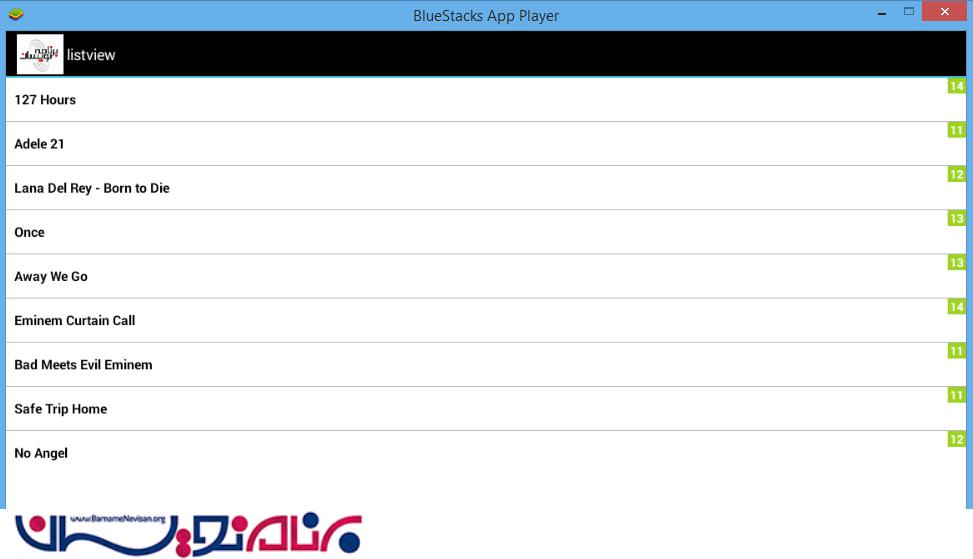
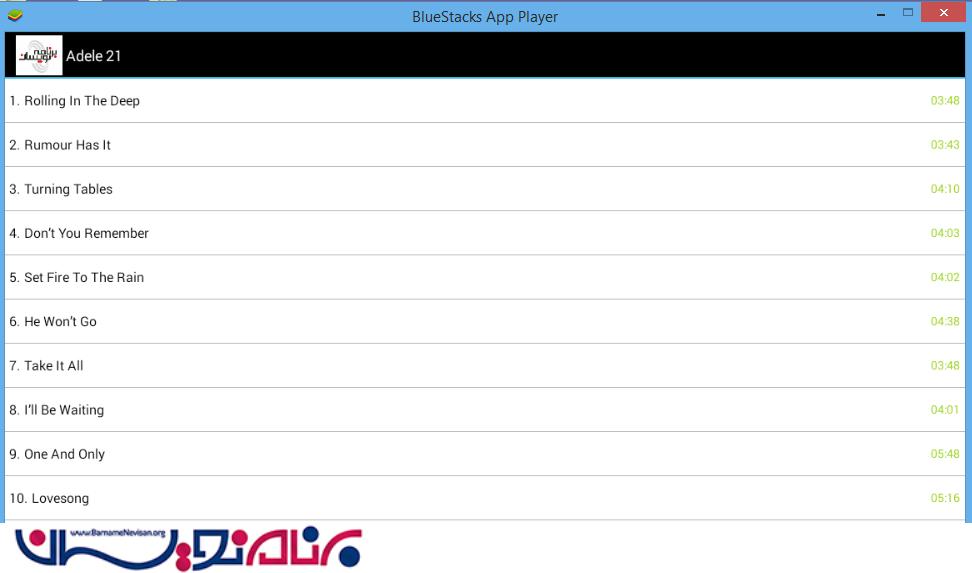
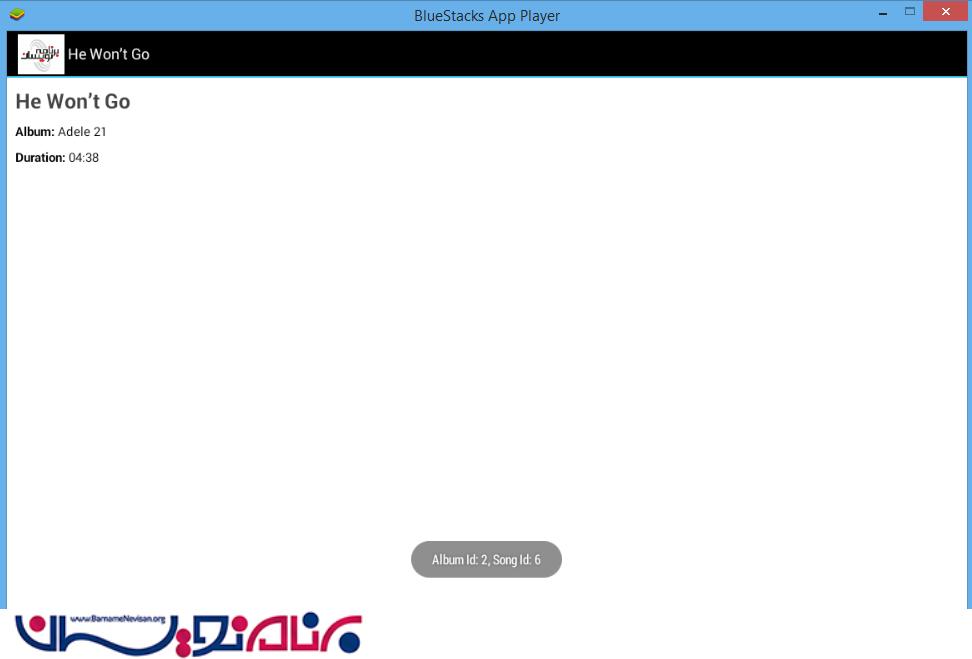

- Android
- 2k بازدید
- 7 تشکر