
ویرایش ، افزودن و حذف کردن مقدار با استفاده از shared preference در اندروید
چهارشنبه 13 اردیبهشت 1396در این مقاله قصد داریم که یک مقداری را با استفاده ازshared preference نمایش، اضافه و ویراش و حذف نماییم که معمولا برای تنظیمات کتاب یا هر اپلیکیشنی از این تکنولوژی shared preference استفاده می نمایند.
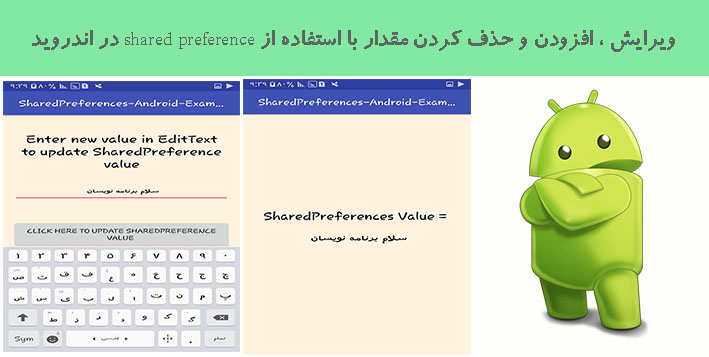
در این سورس ما 3 تا کلاس داریم:
MainActivity.java
UpdateActivity.java
DisplayActivity.java
و همین طور از 3 لایه ی layout استفاده می نماییم:
activity_main.xml
activity_update.xml
activity_display.xml
این سورس چند کار با هم را انجام می دهد :
نمایش مقدار
ویرایش کردن مقدار
حذف مقدار
و افزودن مقدار
ابتدا در کلاس main activity قطعه کد زیر را اضافه نمایید:
import android.content.Context;
import android.content.Intent;
import android.content.SharedPreferences;
import android.support.v4.content.SharedPreferencesCompat;
import android.support.v7.app.AppCompatActivity;
import android.os.Bundle;
import android.view.View;
import android.widget.Button;
import android.widget.EditText;
import android.widget.Toast;

public class MainActivity extends AppCompatActivity {

    Button buttonStore, buttonShow, buttonUpdate, buttonDelete ;
    EditText editText ;
    SharedPreferences sharedPreferences ;
    String ValueHolder;
    SharedPreferences.Editor editor ;
    Intent intent ;

    @Override
    protected void onCreate(Bundle savedInstanceState) {
        super.onCreate(savedInstanceState);
        setContentView(R.layout.activity_main);

        buttonStore = (Button)findViewById(R.id.storeValue);
        buttonShow = (Button)findViewById(R.id.showValue);
        buttonUpdate = (Button)findViewById(R.id.updateValue);
        buttonDelete = (Button)findViewById(R.id.deleteValue);
        editText = (EditText)findViewById(R.id.editText);

        sharedPreferences = getSharedPreferences("PreferencesTAG", Context.MODE_PRIVATE);


        buttonStore.setOnClickListener(new View.OnClickListener() {
            @Override
            public void onClick(View view) {

                if(sharedPreferences.getString("NAME", null) == null)
                {
                    editor = sharedPreferences.edit();

                    ValueHolder = editText.getText().toString() ;

                    editor.putString("NAME", ValueHolder);

                    editor.commit();

                    Toast.makeText(MainActivity.this,
                            "Value Submitted Successfully",
                            Toast.LENGTH_LONG).show();
                }
                else {

                    Toast.makeText(MainActivity.this,
                            "Value is Already filled into SharedPreferences. To update current value please click on Update button.",
                            Toast.LENGTH_LONG).show();

                }
            }
        });

        buttonShow.setOnClickListener(new View.OnClickListener() {
            @Override
            public void onClick(View view) {

                intent = new Intent(MainActivity.this, DisplayActivity.class);

                startActivity(intent);

            }
        });


        buttonUpdate.setOnClickListener(new View.OnClickListener() {
            @Override
            public void onClick(View view) {

                intent = new Intent(MainActivity.this, UpdateActivity.class);

                startActivity(intent);

            }
        });

        buttonDelete.setOnClickListener(new View.OnClickListener() {
            @Override
            public void onClick(View view) {

                editor = sharedPreferences.edit();

                editor.remove("NAME") ;

                editor.apply();

                editor.commit() ;

                Toast.makeText(MainActivity.this, "Value Deleted Successfully", Toast.LENGTH_LONG).show();

            }
        });

    }
}
حالا در قسمت layout قطعه کد زیر را قرار دهید:
<RelativeLayout xmlns:android="http://schemas.android.com/apk/res/android"
    xmlns:tools="http://schemas.android.com/tools"
    android:id="@+id/activity_main"
    android:layout_width="match_parent"
    android:layout_height="match_parent"
    android:paddingBottom="@dimen/activity_vertical_margin"
    android:paddingLeft="@dimen/activity_horizontal_margin"
    android:paddingRight="@dimen/activity_horizontal_margin"
    android:paddingTop="@dimen/activity_vertical_margin"
    tools:context="com.android_examples.sharedpreferences_android_examplescom.MainActivity"
    android:background="#FFF3E0">

    <EditText
        android:layout_width="fill_parent"
        android:layout_height="wrap_content"
        android:inputType="textPersonName"
        android:hint="Enter SharedPreferences Value"
        android:ems="10"
        android:layout_alignParentTop="true"
        android:layout_centerHorizontal="true"
        android:layout_marginTop="113dp"
        android:id="@+id/editText"
        android:gravity="center"/>

    <Button
        android:text="Click here to store ediitext value into sharedpreferences"
        android:layout_width="fill_parent"
        android:layout_height="wrap_content"
        android:layout_centerVertical="true"
        android:layout_centerHorizontal="true"
        android:id="@+id/storeValue" />

    <Button
        android:text="Show value stored in sharedpreferences"
        android:layout_width="fill_parent"
        android:layout_height="wrap_content"
        android:id="@+id/showValue"
        android:layout_below="@+id/storeValue"
        android:layout_marginTop="7dp"
         />

    <Button
        android:text="Update value stored in sharedpreferences"
        android:layout_width="fill_parent"
        android:layout_height="wrap_content"
        android:layout_below="@+id/showValue"
        android:layout_marginTop="7dp"
        android:id="@+id/updateValue" />

    <Button
        android:text="Delete value stored in sharedpreferences"
        android:layout_width="wrap_content"
        android:layout_height="wrap_content"
        android:layout_below="@+id/updateValue"
        android:layout_centerHorizontal="true"
        android:layout_marginTop="7dp"
        android:id="@+id/deleteValue" />

</RelativeLayout>
برای ویرایش کردن مقدار کلاس هم از قطعه کد زیر استفاده نمایید:
import android.content.Context;
import android.content.SharedPreferences;
import android.support.v7.app.AppCompatActivity;
import android.os.Bundle;
import android.view.View;
import android.widget.Button;
import android.widget.EditText;
import android.widget.Toast;

public class UpdateActivity extends AppCompatActivity {

    EditText editText ;
    Button button ;
    String Holder, HolderUpdate ;
    SharedPreferences sharedPreferences ;
    SharedPreferences.Editor editor ;
    @Override
    protected void onCreate(Bundle savedInstanceState) {
        super.onCreate(savedInstanceState);
        setContentView(R.layout.activity_update);

        editText = (EditText)findViewById(R.id.editText2);

        button = (Button)findViewById(R.id.button2) ;

        sharedPreferences = getSharedPreferences("PreferencesTAG", Context.MODE_PRIVATE);

        editor = sharedPreferences.edit();

        Holder = sharedPreferences.getString("NAME", null);

        editText.setText(Holder);

        button.setOnClickListener(new View.OnClickListener() {
            @Override
            public void onClick(View view) {

                HolderUpdate = editText.getText().toString() ;

                editor.putString("NAME", HolderUpdate);

                editor.commit();

                Toast.makeText(UpdateActivity.this, "SharedPreferences Value Updated.", Toast.LENGTH_LONG).show();

            }
        });

    }
}
لایه ی layout به صورت زیر خواهد بود:
<RelativeLayout xmlns:android="http://schemas.android.com/apk/res/android"
    xmlns:tools="http://schemas.android.com/tools"
    android:id="@+id/activity_update"
    android:layout_width="match_parent"
    android:layout_height="match_parent"
    android:paddingBottom="@dimen/activity_vertical_margin"
    android:paddingLeft="@dimen/activity_horizontal_margin"
    android:paddingRight="@dimen/activity_horizontal_margin"
    android:paddingTop="@dimen/activity_vertical_margin"
    tools:context="com.android_examples.sharedpreferences_android_examplescom.UpdateActivity"
    android:background="#FFF3E0">

    <EditText
        android:layout_width="fill_parent"
        android:layout_height="wrap_content"
        android:inputType="textPersonName"
        android:ems="10"
        android:layout_alignParentTop="true"
        android:layout_centerHorizontal="true"
        android:layout_marginTop="141dp"
        android:id="@+id/editText2"
        android:gravity="center"
        android:hint="Value Display Here"/>

    <Button
        android:text="Click Here To Update sharedpreference value "
        android:layout_width="wrap_content"
        android:layout_height="wrap_content"
        android:layout_centerVertical="true"
        android:layout_centerHorizontal="true"
        android:id="@+id/button2" />

    <TextView
        android:text="Enter new value in EditText to update SharedPreference value"
        android:layout_width="wrap_content"
        android:layout_height="wrap_content"
        android:layout_marginTop="23dp"
        android:id="@+id/textView"
        android:gravity="center"
        android:textSize="25dp"
        android:textColor="#000000"
        android:layout_alignParentTop="true"
        android:layout_alignParentLeft="true"
        android:layout_alignParentStart="true" />

</RelativeLayout>
برای نمایش مقدار هم از کلاس زیر استفاده نمایید:
import android.content.Context;
import android.content.SharedPreferences;
import android.support.v7.app.AppCompatActivity;
import android.os.Bundle;
import android.widget.TextView;

public class DisplayActivity extends AppCompatActivity {

    String Holder;
    SharedPreferences sharedPreferences ;
    TextView textView ;
    @Override
    protected void onCreate(Bundle savedInstanceState) {
        super.onCreate(savedInstanceState);
        setContentView(R.layout.activity_display);

        sharedPreferences = getSharedPreferences("PreferencesTAG", Context.MODE_PRIVATE);

        Holder = sharedPreferences.getString("NAME", null);

        textView = (TextView)findViewById(R.id.textView3);

        textView.setText(Holder);


    }
}
لایه ی نمایش به صورت زیر خواهد بود:
<RelativeLayout xmlns:android="http://schemas.android.com/apk/res/android"
    xmlns:tools="http://schemas.android.com/tools"
    android:id="@+id/activity_display"
    android:layout_width="match_parent"
    android:layout_height="match_parent"
    android:paddingBottom="@dimen/activity_vertical_margin"
    android:paddingLeft="@dimen/activity_horizontal_margin"
    android:paddingRight="@dimen/activity_horizontal_margin"
    android:paddingTop="@dimen/activity_vertical_margin"
    tools:context="com.android_examples.sharedpreferences_android_examplescom.DisplayActivity"
    android:background="#FFF3E0">


    <TextView
        android:text="SharedPreferences Value = "
        android:layout_width="wrap_content"
        android:layout_height="wrap_content"
        android:layout_alignParentTop="true"
        android:layout_centerHorizontal="true"
        android:layout_marginTop="198dp"
        android:id="@+id/textView2"
        android:textColor="#000000"
        android:textSize="25dp"
        android:gravity="center"/>

    <TextView
        android:text="TextView"
        android:textColor="#000000"
        android:textSize="25dp"
        android:gravity="center"
        android:layout_width="wrap_content"
        android:layout_height="wrap_content"
        android:layout_below="@+id/textView2"
        android:layout_centerHorizontal="true"
        android:layout_marginTop="18dp"
        android:id="@+id/textView3" />

</RelativeLayout>
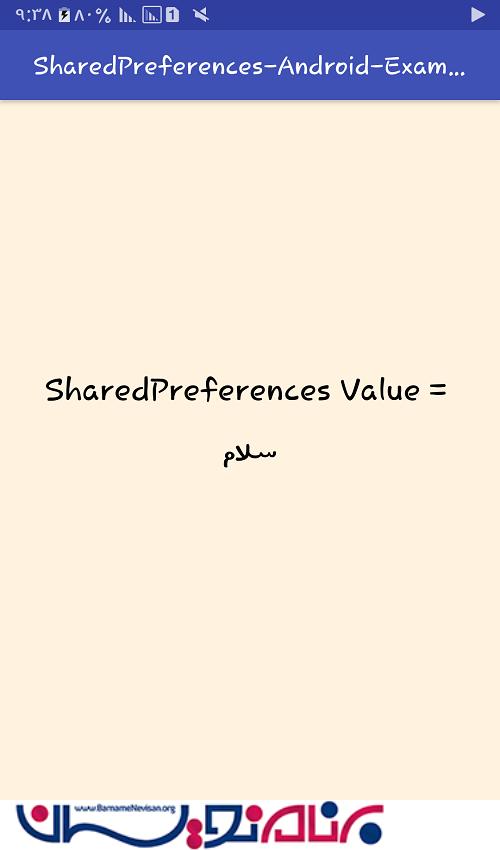
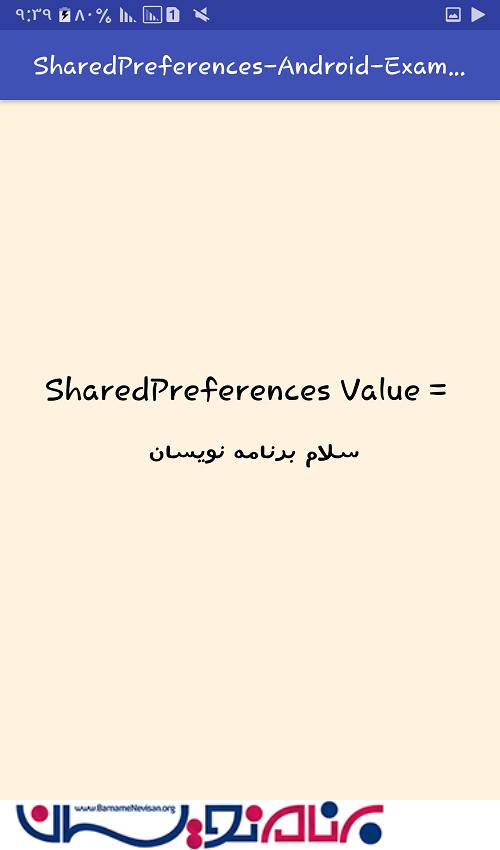
خروجی به صورت زیر خواهد بود:



- Android
- 2k بازدید
- 5 تشکر